
Mind mapping is a revolutionary tool used for creating, thinking, organizing, note taking and brainstorming.
The modern iteration of mind mapping is claimed to have been created by Tony Buzan – but who really knows. If anything, credit definitely goes to Tony for popularizing the method and bringing it to the masses.
Here at Asian Efficiency, we like to think of ourselves as avid users of mindmapping, rather than “certified experts”. We use mind mapping for all sorts of things in our daily lives, and we want to share some of that with you.
Quick note: in Commonwealth countries, mind maps are often referred to as spidergrams or spidergraphs. They are also knows as concept maps or concept mapping in other parts of the world.
What is Mind Mapping?

All mind mapping begins with a central idea in the middle of your map. Like this:
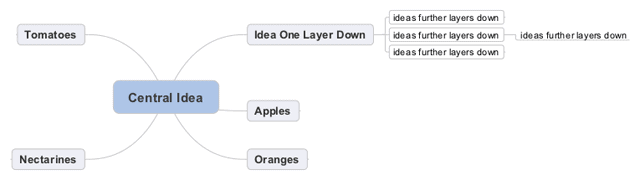
You then build branches or nodes around the mindmap, with the first layer being one hierarchical layer of thought down. Further layers and subsequent branches are then further levels down in logical thought. For example:
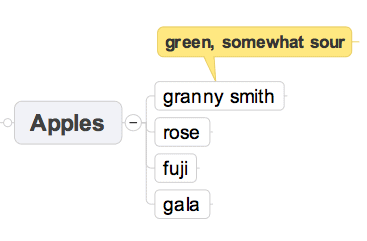
Mind maps also often include callouts, which provide “meta” commentary on a branch or idea – these comments are belong “across” in the hierarchy of thought, rather than above or below.
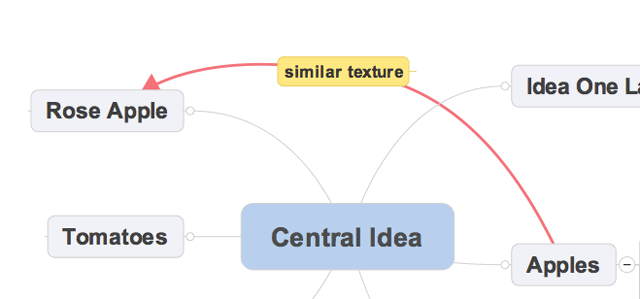
Relationships within mindmaps show how concept links together:
There is a lot of talk about mind mapping activating “the whole brain” or “both hemispheres” or whatnot. In general, we like to take the practical approach here at Asian Efficiency: does it help us get things done better and more efficiently? If yes, then we’re all for it.
If you are interested in how mind mapping helps you to become more effective, we share a lot of thoughts on mind mapping alongside other productivity and time management topics in our exclusive newsletter. We would love to share our content with you that would help you become more organized and effective. You can sign up below and we will start sending you some of our (great) content right away!
Getting Started with Mind Mapping
Getting started with mindmapping begins with choosing how you’re going to draw the mind map. You can use pen and paper to keep things simple, but we much prefer a quality mind mapping application, such as Mindjet MindManager for Mac or Mindjet MindManager for Windows.
Here are the articles that we have written about the different aspects of mind mapping:
- 7 Everyday Mind Mapping Uses. 7 ways to use mind maps in your everyday life.
- MindManager 9 for Mac Review. Our review of MindJet MindManager 9.5 for Mac. Recommendations for who it’s good for – and who it’s not.
- How to Build New Habits with Mind Maps. Thanh explains a very unique way to use mind maps, as reinforcers for the creation of new habits.
- 10 Ways to Use Mindmaps over Text Notes. 10 different ways that mindmaps kick ass over text notes. And when they don’t!
- Effective Brainstorming Using Mind Maps. Learn about divergent and convergent thinking to help you brainstorm effectively using mind maps.
- How to Learn Mind Mapping. The best way to learn effective mind mapping – by teaching it to someone else!
- How to Read a Mind Map Properly. Here is how you read a mind map (for beginners).
- Mindmaps, notes and spreadsheets. How to use different types of information storage (including mindmaps) effectively. What type of information is best suited for each type of storage.
- 5 Examples of Asian Efficiency Mind Maps (And See How We Mind Map). Get a look inside the brains of the guys behind Asian Efficieny by looking at their mindmaps.
- How to Teach Someone Mindmapping. A look at basic mindmapping, with the goal of teaching you good mind mapping principles you can then pass onto someone else.
- Goals and Task Managers. Thanh shows us how he uses mind maps to formulate his goals.
- Goal Setting the Asian Efficiency Way. How to use mindmaps to track your goals as they progress.
- Agile Results. Our series on implementing Agile Results relies heavily on mindmaps as a way of tracking outcomes.
- 4 Steps to Effective Book Summaries with Mind Maps. How to write book summaries using mind maps as an organizing tool.
- How to Turn Notes into Actionable Steps. Aaron shows us how to take notes that you have written from books or talks and turn them into actionable items with a mind map.
- Keywords for Accelerated Learning and Note-Taking. How to use keywords and mind maps to effectively take notes and learn faster.
- Mind Mapping for Condensing Material. Different ways to use mind maps to condense complex material and subjects for learning and application.
Types of Mind Maps
There are many different types of mind maps. Here are the more common ones that we use at Asian Efficiency.
The Straight Mind Map
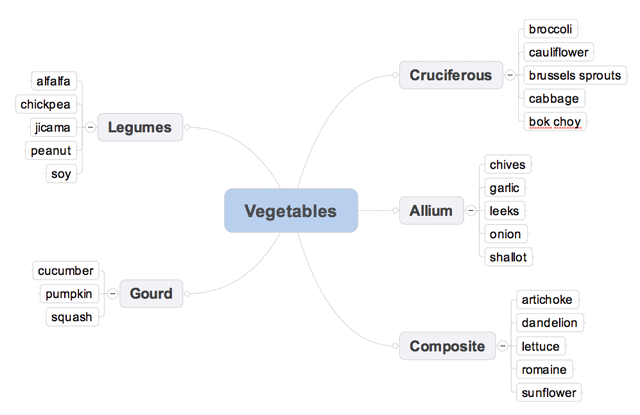
This is a mindmap with one central idea, and hierarchical nodes.
The Meta Mind Map
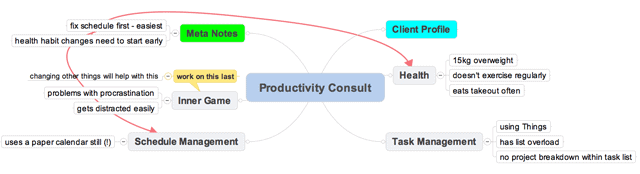
This is like a straight mindmap (one central idea, hierarchical nodes), but also includes callouts and highlighted nodes to provide additional commentary and information. When we do work for consulting clients, these are the mindmaps that we use the most often.
Multi-Idea Mind Maps
This type of mind map contains multiple central ideas, and shows the relationship between all the central ideas and their hierarchical nodes. A good example of this type of mind map are mind maps for designed business or computer systems.
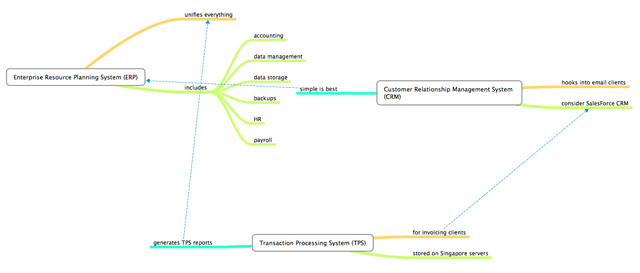
These kind of mind maps tend to be hard to generate with Mindjet MindManager, and we prefer to use MindNode for these.
Common Uses of Mind Maps
Mind mapping has a lot of different uses – much more than most people think are possible. You can use mindmapping for:
- Brainstorming. Mindmaps are great for brainstorming project ideas, or coming up with solutions for business problems (the problem being the central node).
- Note Taking. We use mind maps to take notes for books, lectures or seminars. The advantage of a mind map is that you get to sort the ideas in a way that makes sense to you, rather than in the linear form presented by the source material.
- Organizing and Reorganizing. Mindmaps work equally well for organizing your life – just see what we’ve done with Agile Results and Mind Maps. You can also take existing information, and reorganize it within a mindmap, to create new relationships between ideas and concepts.
- Creating. All the articles on Asian Efficiency (including this one) begin life as mindmaps.
The uses for mind mapping are pretty much endless – the tools available to us are pretty much open-ended and infinite in capacity!
Mind Mapping Tools and Applications
The simplest way to mindmap is to use pen and paper. We still occasionally sketch simple mindmaps into a Moleskine Notebook.
When it comes to Apps and Software, we prefer Mindjet MindManager for daily use. It’s fast, it’s stable, it has a real company with real support behind it (not just a lone developer), and it also has accompanying iOS applications.
Check out Mindjet MindManager here.
A great alternative to MindManager is MindNode, which is useful for multi-idea mind maps. It’s not as slick as MindManager, but it still works quite well.
We’re making it a point to re-review a lot of mind mapping software, and we’ll let you know more about others as we take a look at them.
Mind Mapping Resources
Here are some other great places to find out about Mind Mapping:
- MindJet. A great company that really embraces the use of mindmapping for business and professional use.
- Sciplore. For those interested in the science behind data organization and mind maps.
- Efficacy of Mind Maps as a study technique. Interesting study about how motivation plays a significant role in the ability to use mindmaps effectively.